返回顶部代码
2015-6-15 简爱
代码实现起来 也不复杂
就是没测试过兼容怎么样
效果如下
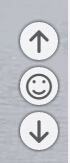
自带 返回顶部 底部 跳转评论
默认的 评论 容器为:#comments 如果不是请修改 主题或者 本文的 JS 代码即可
代码部分 分为 JS 与 CSS
先说 JS 部分:
/**

 * 返回顶部 底部 转至评论

 * 20140615 asilu.com

**/


$(function(){

	var ja_gotop, ja_gobottom, ja_comment,

		comment = '#comments',

		$body = $("html,body"),

		face_list = [

			'sad', 'neutral', 'wondering', 'smile', 'wink', 'happy', 'grin', 'cool', 'shocked', 'sleepy', 'evil'

		];


	$('body').append('\

		<div class="ja-gotop" title="返回顶部"><span class="icon-arrow-up2"></span></div>\

		<div class="ja-gocomment" title="滚动至评论"><span></span></div>\

		<div class="ja-gobottom" title="返回底部"><span class="icon-arrow-down2"></span></div>');

	ja_comment = $('.ja-gocomment');


	ja_comment.click(function(){

		if($(comment).length) $body.animate({

			scrollTop: $(comment).offset().top

		},

		500);

	});


	ja_gobottom = $('.ja-gobottom')

		.click(function(){

			$body.animate({

				scrollTop: $(document).height() - $(window).height()

			},

			500);

		});


	ja_gotop = $('.ja-gotop')

		.click(function(){

			$body.animate({

				scrollTop: 0

			},

			500);

		});


	ja_scroll(window);

	$(window).scroll(function() {

		ja_scroll(this);

	});


	function ja_scroll(th){

		var pct = $(th).scrollTop() / ($(document).height() - $(window).height()) * 100;

		pct = parseInt(pct / 10);

		$('> span', ja_comment).attr('class', 'icon-'+ face_list[pct]);


		($(document).height() - $(window).height() - $(th).scrollTop() > 200)

			? ja_gobottom.css('right', '10px')

			: ja_gobottom.css('right', '-40px');


		($(th).scrollTop() > 200)

			? ja_gotop.css('right', '10px')

			: ja_gotop.css('right', '-40px');

	}

});
紧接着 CSS:
.ja-gotop,

.ja-gocomment,

.ja-gobottom {

	position: fixed;

	padding: 0;

	margin: 0;

	right: -40px;

	text-align: center;

	line-height: 42px;

	height: 38px;

	width: 38px;

	border-radius: 50%;

	background: #fff;

	cursor: pointer;

	box-shadow: 0 0 5px #000;


	font-size: 26px;

	-webkit-transition :all .5s;

	transition :all .5s;


	filter: alpha(opacity=50);

	-moz-opacity:0.8;

	opacity: 0.8;

}


.ja-gotop:hover,

.ja-gocomment:hover,

.ja-gobottom:hover {

	filter: alpha(opacity=100);

	-moz-opacity: 1;

	opacity: 1;

}


.ja-gotop {

	bottom: 115px;

}

.ja-gocomment {

	bottom: 70px;

	right: 10px;

}

.ja-gobottom {

	bottom: 25px;

}


.ja-gocomment:hover span:before {

	content: '\e96b';

}
下面还是 贴一个 预览页面吧
<!DOCTYPE html>

<html>

<head>

	<meta charset="UTF-8">

	<title>风骚的返回顶部</title>

	<script src="http://api.asilu.com/cdn/jquery-1.9.1.min.js,ja.gotop-1.js,ja.gotop-1.css,ja.face.css" type="text/javascript"></script>

</head>

<body style="height: 9999px;background:#36A803;">


<div id="comments" style="margin-top:2000px;"><h3>默认评论容器为 <strong style="color:#f00;">#comments</strong></h3></div>

</body>

</html>
最后重申一边 转载代码请注明出处 貌似等于废话
最后还要记得添加 字体图标文件,
简单的方法就是直接保存本里使用的 字体文件 以及 CSS 如想自定义其他 图标可去 https://icomoon.io/app/
评论:
Liangge
2015-06-26 02:58 回复
站长你的登录/注册怎么实现的非常帅 求分享