天气预报 - CSS 样式练习
2015-1-17 简爱
让和自己慢慢地熟悉一下 CSS 的基本属性,还是那老东西来练手吧
我是挺相信自己 是写不出什么好看的 CSS样式的 [害羞/]
效果如图:
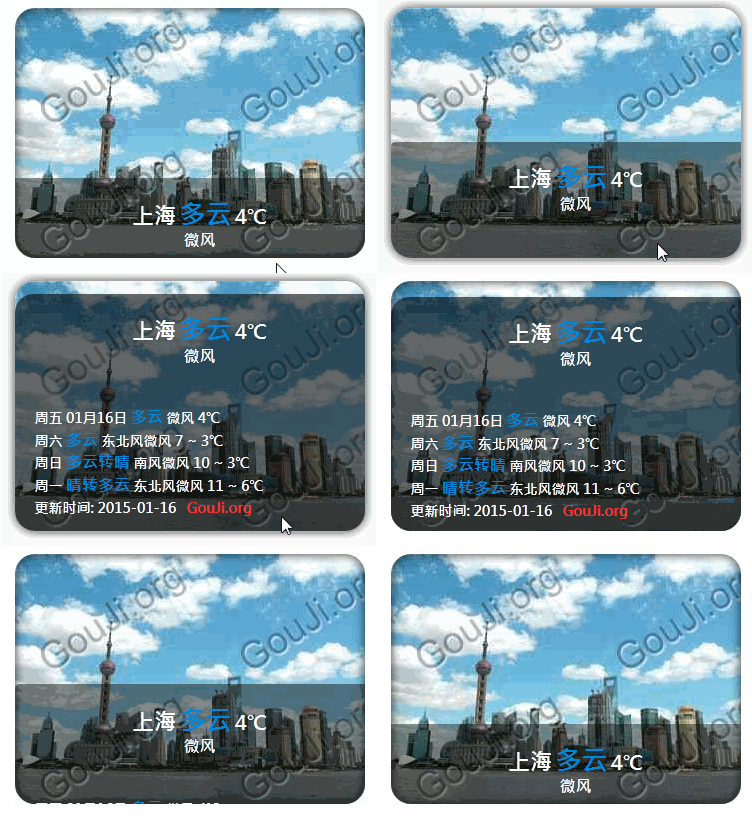
动画采用 CSS, 代码不含任何 JS (才开始尝试)
代码如下:
当然不包含 获取天气部分
最后福利来了
如果想让 天气数据 每天 更新 So easy 有如下代码就可以微博客添加 天气预报:
什么放在 侧边栏 太大?
可以为
添加
即可改变宽度为
想获取 指定城市天气预报?
也可以 修改
使用期间 也不必担心 总是获取天气数据 拖慢 网站加载速度,因为天气数据是存储在本地的 更新间隔为
我是挺相信自己 是写不出什么好看的 CSS样式的 [害羞/]
效果如图:
动画采用 CSS, 代码不含任何 JS (才开始尝试)
代码如下:
当然不包含 获取天气部分
<!DOCTYPE html>
<html>
<head>
<meta http-equiv="Content-Type" content="text/html; charset=UTF-8" />
<title>天气预报 - CSS 样式</title>
<style>
body{width:100%}
.weather-card{position:relative;overflow:hidden;padding:0;margin:0 auto;box-shadow:0 0 10px rgba(0,0,0,0.8) inset;width:350px;height:250px;background-color:rgba(255,255,255,0.6);background-image:url(http://gouji.org/weather/350/101020100.jpg);background-repeat:no-repeat;background-size:cover;border-radius:20px}
.weather-card:hover{box-shadow:0 0 10px rgba(0,0,0,0.8)}
.weather-info{position:absolute;bottom:0;width:350px;height:80px;overflow:hidden;padding:0;margin:0;background-color:rgba(0,0,0,.4);border-radius:0 0 20px 20px;color:#fff;font-family:"Microsoft JhengHei","Microsoft Yahei","微软雅黑","华文细黑";font-size:14px;font-weight:600;line-height:22px;border-radius:0 0 20px 20px;-webkit-transition:all 1s ease-in-out;-moz-transition:all 1s ease-in-out;-ms-transition:all 1s ease-in-out;-o-transition:all 1s ease-in-out;transition:all 1s ease-in-out}
.weather-card:hover .weather-info{height:250px;background-color:rgba(0,0,0,.6);border-radius:20px}
.weather-card .w-today{margin-top:20px;text-align:center}
.weather-card .w-city{font-size:22px}
.weather-card .w-weather{font-size:26px;font-weight:700;color:#08d}
.weather-card .w-temp{font-size:20px}
.weather-card .w-wind{font-size:16px}
.weather-card .w-tips{margin-left:10px;position:relative;top:25px;font-size:14px}
.weather-card .w-tips b{font-size:16px;color:#08d;font-weight:700}
.weather-card .w-tips::after{content:' GouJi.org';color:#f33}
</style>
</head>
<body>
<br>
<div class="weather-card">
<div class="weather-info">
<p class="w-today">
<span class="w-city">上海</span>
<span class="w-weather">多云</span>
<span class="w-temp">4℃</span><br>
<span class="w-wind">微风</span>
</p>
<p class="w-tips">
周五 01月16日 <b>多云</b> 微风 4℃<br>
周六 <b>多云</b> 东北风微风 7 ~ 3℃<br>
周日 <b>多云转晴</b> 南风微风 10 ~ 3℃<br>
周一 <b>晴转多云</b> 东北风微风 11 ~ 6℃<br>
更新时间: 2015-01-16
</p>
</div>
</div>
</body>
</html>
最后福利来了
如果想让 天气数据 每天 更新 So easy 有如下代码就可以微博客添加 天气预报:
<div id="weather"></div>

<script src="http://gouji.org/api/weather/tq-2.js" type="text/javascript"></script>

<script type="text/javascript">getWeather();</script>
什么放在 侧边栏 太大?
可以为
<div id="weather"></div>添加
class="w-240" 或 class="w-260"即可改变宽度为
240 或 260想获取 指定城市天气预报?
也可以 修改
getWeather(); 为 getWeather('嘉定'); 即可获取 嘉定 天气预报使用期间 也不必担心 总是获取天气数据 拖慢 网站加载速度,因为天气数据是存储在本地的 更新间隔为
1小时 一小时之内是不会再去远程获取天气信息的评论: